
A customer sends in a request for an estimate. Someone needs to read it, collect the details, enter the information into your CRM, and figure out who should respond. Then there’s the estimate itself, the follow-up emails, and eventually, if everything goes well, the invoice.
None of those individual steps is particularly complicated. But when you’re running a small business, they add up. And while your team is handling all that administrative work, there’s another customer inquiry waiting.
This is where AI automation for small business can make a difference.
You don’t need to replace your software or rethink how your entire company operates. Often, the best place to start is with a task someone already does every week, following roughly the same process.
The idea is simple: connect the tools you’re already using, automate the repetitive parts, and keep a person involved where judgment matters.
Let’s look at how that works, what it costs, and where we’d recommend starting.
How to Pick Your First Small Business Automation
Before jumping into the technology, look at how work moves through your company.
Where does information get copied between systems? Which tasks keep getting pushed to the end of the day? What does your team spend time doing that doesn’t really require their expertise?
These are the kinds of questions we ask when evaluating workflow automation for small business.
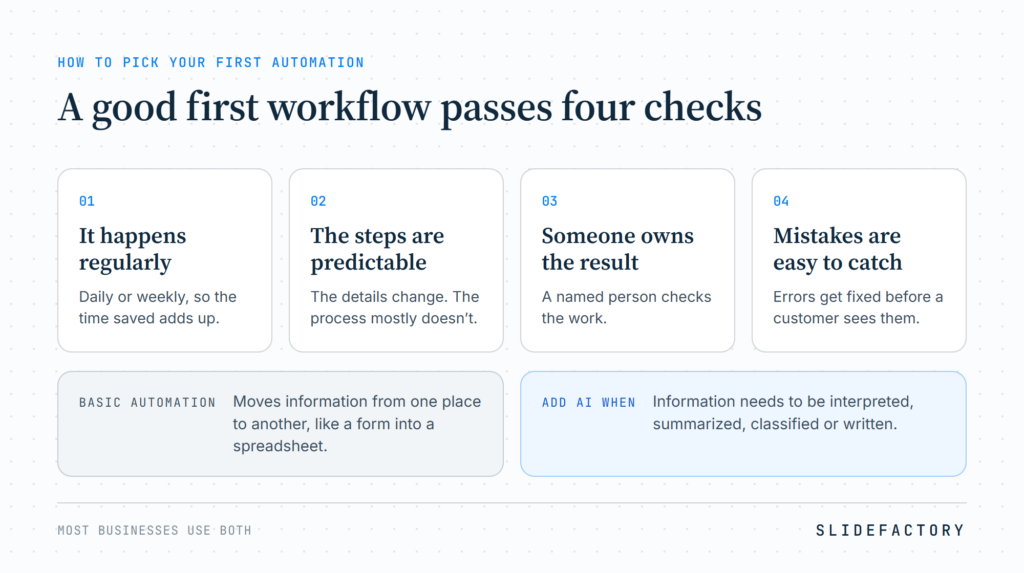
A good first workflow usually meets four criteria:
- It happens regularly. Daily or weekly tasks offer more opportunities to save time.
- The steps are predictable. The information might change, but the process is mostly the same.
- Someone owns the result. There’s a person responsible for checking the work.
- Mistakes are easy to catch. Errors can be corrected before they reach a customer or create a bigger problem.
It’s also important to understand that not everything needs AI.
If you’re moving information from a form into a spreadsheet, a basic automation might be enough. AI becomes useful when information needs to be interpreted, summarized, classified, or written.
Most businesses will benefit from a combination of both.
Six Workflow Automation Examples for Small Businesses
Let’s follow a few of those everyday tasks through a typical service business.
These six AI automation examples cover the work between receiving a customer inquiry and managing the business afterward. Each includes suggested tools, monthly costs, and the point where someone should review the output.
1. Customer Intake: Get Inquiries to the Right Person
Your website gets a new inquiry about a project. Another customer sends an email with a support question. Someone else leaves a voicemail.
Normally, an employee has to review each message, determine what it’s about, and make sure it reaches the right person.
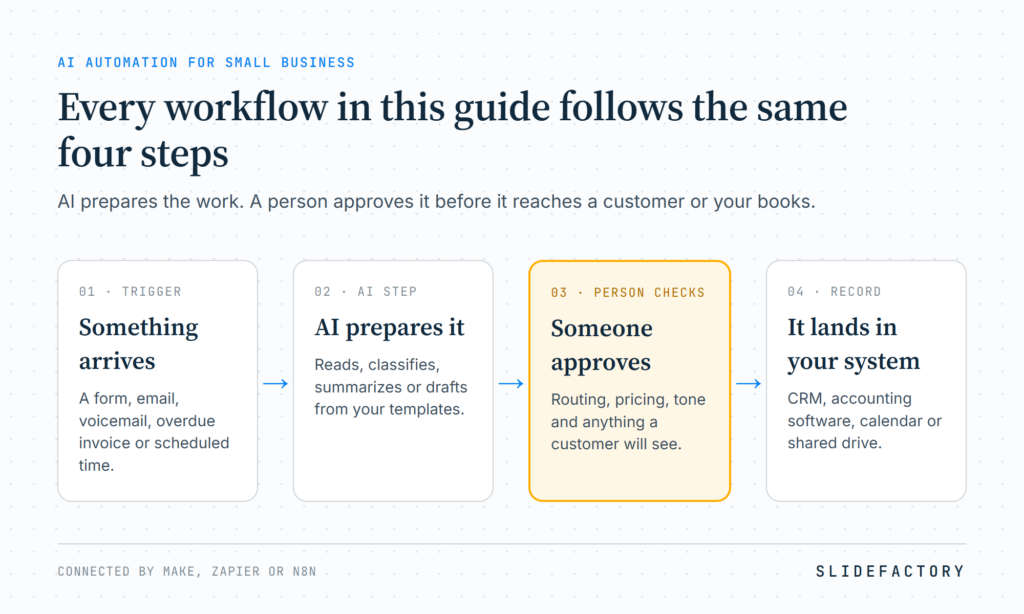
With automation, that process can start as soon as the message arrives.
AI can read or transcribe the inquiry, identify the type of request, extract the contact information, and prepare a summary. A tool like Make or Zapier can then send that information into HubSpot or another CRM.
Your team receives an organized request rather than another message to sort through.
Example workflow
- Trigger: New form, email, or transcribed voicemail
- Tools: HubSpot Free CRM, Make Core, and an AI model
- AI handles: Classification, contact details, and response drafts
- Human review: Confirm routing and approve customer-facing responses
- Setup effort: Low to moderate
- Monthly subscriptions: Starting at $12, plus AI usage
The goal is to make sure inquiries are handled consistently, especially when several people are responsible for responding.
2. Quotes and Estimates: Start With a Draft, Not a Blank Page
Now that the inquiry has reached the right person, someone needs to prepare an estimate.
Maybe it’s a remodeling contractor putting together a proposal, an agency estimating a website, or a professional services company preparing a statement of work.
Different industries, but often a similar process.
Someone collects the requirements, checks pricing, organizes the scope, and puts everything into a document.
AI can take the information collected during intake and prepare an initial draft using your existing templates and approved pricing information.
The person responsible still determines the final price, reviews the scope, and approves the estimate. They’re just starting further along in the process.
Example workflow
- Trigger: Completed estimate request
- Tools: HubSpot, Make or Zapier, an AI model, and approved templates
- AI handles: Organizing requirements and drafting the estimate
- Human review: Scope, pricing, exclusions, and approval
- Setup effort: Moderate
- Monthly subscriptions: Starting at $12, plus AI usage
For businesses producing similar estimates repeatedly, this can remove a considerable amount of preparation work without handing important decisions over to AI.
3. Scheduling and Follow-Up: Keep Things Moving
The estimate goes out. The customer has a few questions and wants to schedule a call.
Now someone needs to coordinate calendars, confirm a time, send a reminder, and follow up if the customer doesn’t book.
Scheduling tools like Calendly already handle much of this. But connecting them to your other systems can take things further.
For example, a new inquiry can receive the appropriate booking link automatically. When the customer schedules, their CRM record updates. If they haven’t responded after a certain period, the workflow can prepare a follow-up or alert your team.
AI becomes useful when the incoming request requires interpretation or a personalized response.
Example workflow
- Trigger: Appointment request or unanswered inquiry
- Tools: Calendly Standard, Make Core, and your CRM
- AI handles: Interpreting requests and drafting follow-ups
- Human review: Exceptions and sensitive conversations
- Setup effort: Low to moderate
- Monthly subscriptions: Starting at $22, before AI usage
You don’t need AI to send a calendar reminder. The value comes from making scheduling part of a connected customer process rather than another separate task.
4. Invoice Reminders and Bookkeeping: Reduce the Administrative Work
The project is finished and the invoice has been sent.
A few weeks later, someone needs to check whether it’s been paid, follow up if necessary, and make sure the transaction is recorded correctly.
Accounting platforms like QuickBooks and Xero already automate parts of this process, including recurring transactions and payment reminders.
Connecting those tools to your other systems can reduce additional work.
An overdue invoice might create an internal task or prepare a reminder. AI can help categorize transactions, identify missing details, or flag unusual entries for review.
Example workflow
- Trigger: Overdue invoice or transaction requiring review
- Tools: Xero Early or QuickBooks Simple Start, with Make or Zapier
- AI handles: Reminder drafts, category suggestions, and exception summaries
- Human review: Financial decisions, disputes, and unusual transactions
- Setup effort: Low for built-in features; moderate for integrations
- Monthly subscriptions: Starting at $39 for Xero Early and Make Core
Your bookkeeper or accountant should still make the final decisions. Automation handles the preparation and routine follow-up, leaving more time for the work that needs their experience.
5. Weekly Reporting: Bring Your Numbers Together
At some point, you want to know how all this activity is affecting the business.
How many inquiries came in? How many estimates went out? What’s still unpaid? Is website traffic turning into actual opportunities?
The answers are probably available, but they’re spread across your CRM, accounting software, analytics, and other systems.
Someone has to pull the information together before you can use it.
An automated reporting workflow can collect those numbers on a schedule, compare them with previous periods, and use AI to prepare a summary.
Instead of rebuilding the same report, you’re reviewing the results and deciding what needs attention.
Example workflow
- Trigger: Scheduled weekly report
- Tools: Make Core, CRM and accounting integrations, Google Analytics, and an AI model
- AI handles: Summarizing verified figures and identifying notable changes
- Human review: Check unexpected results and conclusions
- Setup effort: Moderate
- Monthly subscriptions: Starting at $12 for Make Core, plus AI usage and existing software
We’ve worked on this problem ourselves with Insyght Studio, an AI platform we built to help smaller teams make better use of their analytics and connected business information.
The value isn’t necessarily having more reports. It’s having the information available when you need it, in a format you can actually use.
6. Routine Documents and Emails: Stop Recreating the Same Work
Customer communications, proposals, onboarding materials, project updates, and internal documents often start with the same structure.
The details change, but much of the writing and formatting stays consistent.
With a set of approved templates, examples, and instructions, AI can prepare drafts using information your team provides.
A project manager might generate a status update from project notes. An office manager might prepare onboarding instructions. A sales representative could draft a follow-up based on a customer’s inquiry.
Someone reviews the output before it goes out.
Example workflow
- Trigger: New document request or completed internal form
- Tools: Google Workspace with Gemini, ChatGPT, or Claude
- AI handles: Organizing information and drafting documents
- Human review: Accuracy, commitments, tone, and approval
- Setup effort: Low for drafting; moderate for connected workflows
- Monthly subscriptions: Starting at $14 per user for Google Workspace Business Standard with annual billing
This approach can also help marketing teams. We cover some of those applications in our guide to AI for marketing automation.
AI Automation for Small Business: Monthly Costs
By now, you’re probably wondering how much of this requires new software.
Possibly less than you’d think.
If you’re already using a CRM, accounting platform, scheduling software, or Google Workspace, you may have many of the pieces in place.
Here’s what the six workflows could cost using published US subscription prices.
| Workflow | Basic stack | More-featured stack |
|---|---|---|
| Customer intake and routing | $12 | $39.99 |
| Quotes and estimates | $12 | $39.99 |
| Scheduling and follow-up | $22 | $35.99 |
| Invoices and bookkeeping | $39 | $57.99 |
| Weekly owner reporting | $12 | $21 |
| Routine documents and emails | $14 | $54 |
| Total if purchased separately | $111/mo | $248.96/mo |
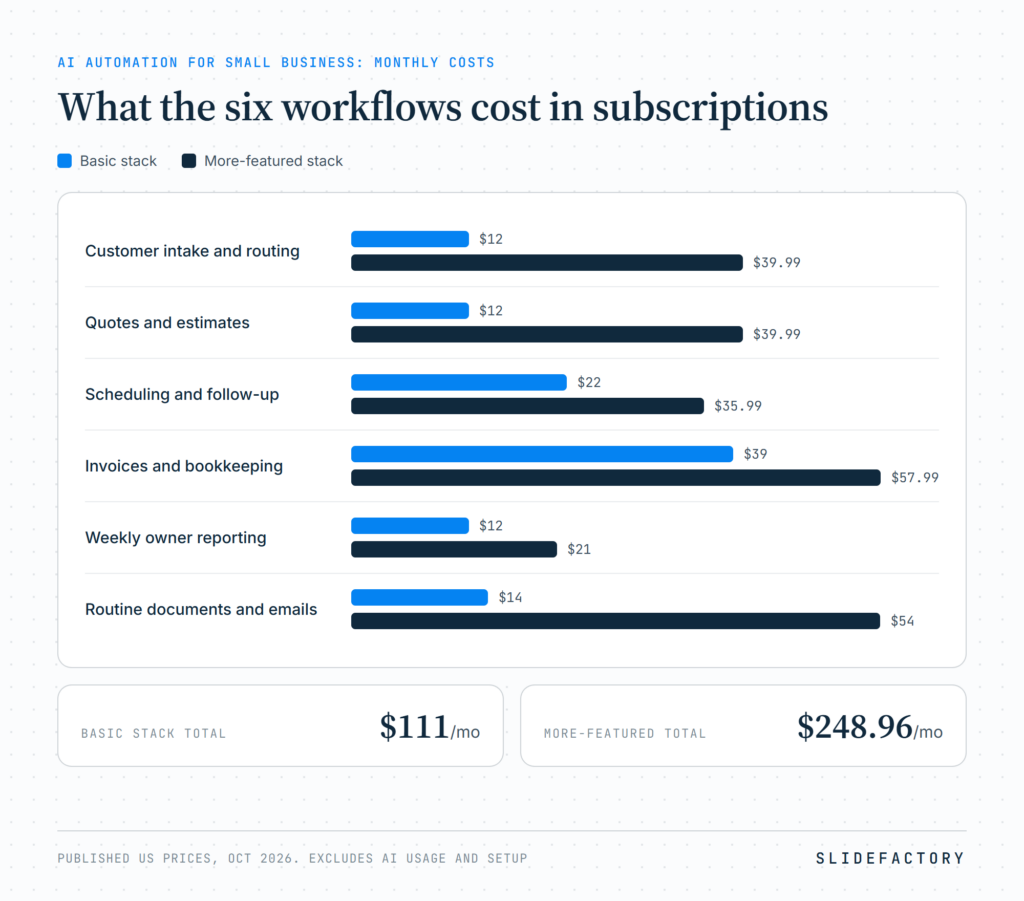
The basic examples use Make Core, HubSpot Free, Calendly Standard, Xero Early, or Google Workspace Business Standard where appropriate.
The more-featured examples use combinations of Zapier Professional, HubSpot Starter, Calendly Teams, QuickBooks Simple Start, Make Pro, and ChatGPT Business.
These are subscription comparisons, not quotes to build the workflows. They exclude usage-based AI API charges, implementation, maintenance, taxes, and existing software not specified in the stack. Some prices require annual billing, and the document example includes ChatGPT Business’s two-seat minimum.
More importantly, you wouldn’t normally purchase separate automation subscriptions for each workflow. The same Make or Zapier account can often run several of them.
Volume also matters. Zapier counts completed tasks, Make uses credits for workflow actions, and n8n bases cloud pricing on workflow executions. n8n also offers self-hosting, which introduces hosting and maintenance responsibilities.
Start with what you’re already paying for and add what’s needed.
How to Measure Hours Saved
An automation can look impressive in a demonstration and still not save your business much time.
That’s why we’d recommend measuring the work before and after implementation.
Take customer intake, for example.
For two weeks, track how many inquiries you receive and how long someone spends reviewing, organizing, and routing each one.
Then measure how much time the automated version takes, including reviewing AI outputs and correcting mistakes.
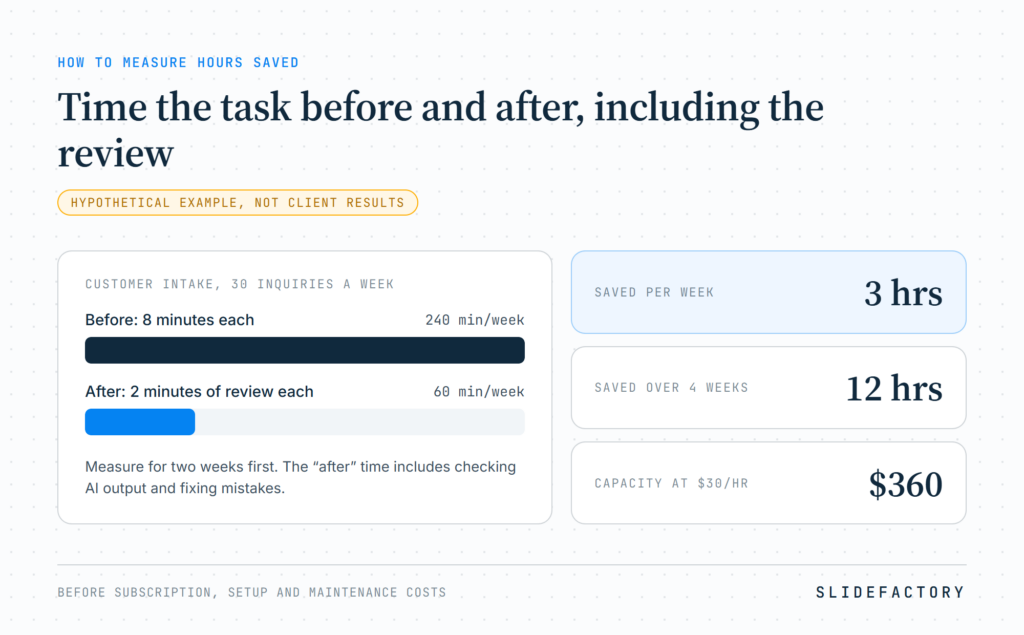
Here’s a hypothetical example:
| Measurement | Example |
|---|---|
| Customer inquiries per week | 30 |
| Original handling time | 8 minutes each |
| Automated review time | 2 minutes each |
| Time before automation | 240 minutes/week |
| Time after automation | 60 minutes/week |
| Weekly time saved | 3 hours |
| Time saved over 4 weeks | 12 hours |
At an assumed labor cost of $30 per hour, that represents $360 in monthly labor capacity before subscription, setup, and maintenance costs.
These are example figures, not client results.
You should also look beyond time saved. Are customers getting faster responses? Are fewer inquiries being missed? Is the information more accurate?
Those improvements can be just as important as reducing administrative work.
For a broader approach to implementation, governance, and ROI, see our AI workflow stack guide.
What Not to Automate Yet
Once you see what automation can handle, it’s tempting to start connecting everything.
But some processes aren’t good candidates, at least not without more planning.
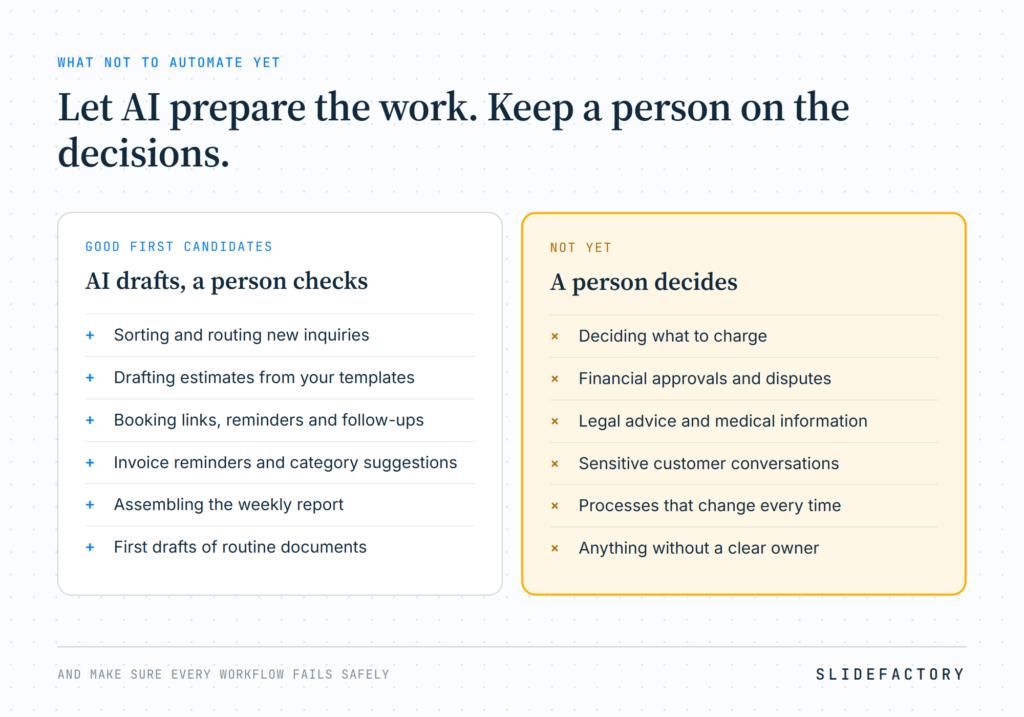
Take that estimate we discussed earlier. AI can organize the requirements and prepare a draft, but it shouldn’t independently decide what to charge or commit your company to work that hasn’t been approved.
The same goes for sensitive customer conversations, financial approvals, legal advice, and medical information.
We’d also be cautious about processes that change significantly every time or have no clear owner.
Data privacy is another consideration.
Before sending customer information through an AI platform, understand where that information goes and how the provider handles it.
OpenAI states that ChatGPT Business and its API don’t use customer data for model training by default. Anthropic makes similar commitments for its commercial products, including Claude Team and its API. Consumer accounts have different terms and settings.
For law offices, medical practices, and other businesses handling sensitive information, those distinctions matter. You’ll still need to evaluate the applicable security, privacy, and regulatory requirements.
Finally, make sure the automation can fail safely. Someone should know when a workflow stops, produces questionable information, or needs attention.
We explore those issues in Why Your AI Automation Keeps Failing.
When to Bring in Help
You can build plenty of useful automations with existing software. Simple integrations and straightforward workflows are often manageable without custom development.
Things become more complicated when you’re connecting multiple systems, handling sensitive data, or building workflows that need to make decisions and respond to changing situations.
That’s where custom integrations and AI agents can be worth considering.
At SLIDEFACTORY, our AI consulting for small business starts by looking at how your company operates, which tools you already use, and where automation might make the most sense.
And that’s where I’d recommend starting, too.
Go back to that first customer inquiry. Think about how many steps it takes to turn a simple request into a completed estimate, an appointment, or a paid invoice.
You probably don’t need to automate every step.
But taking a few repetitive tasks off your team’s plate can make the entire process work better.
Not sure what to automate first?
Our AI Opportunity Assessment starts at $1,500. We’ll review your existing workflows, identify practical opportunities, and help you put together a plan for what makes sense to automate.
Talk with SLIDEFACTORY about an AI Opportunity Assessment.
Prices checkedOctober 2026. Standard published subscription rates are used rather than introductory promotions. Actual costs depend on billing terms, plan limits, seats, usage, and applicable fees.