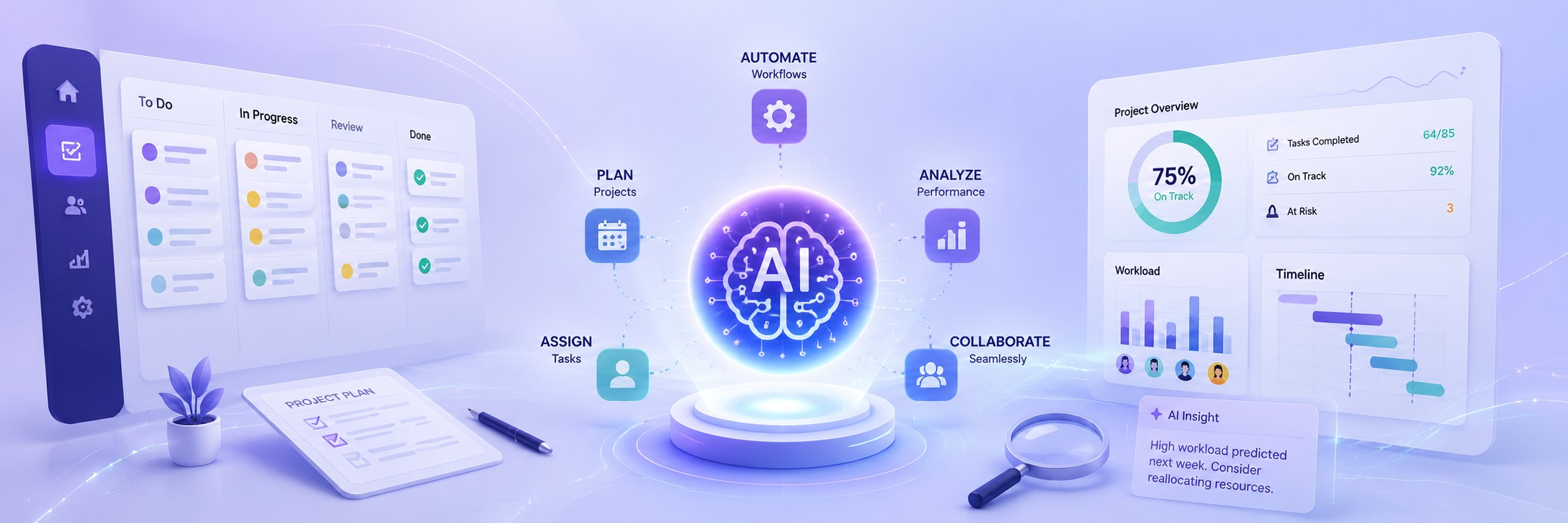
Most project managers know they should be using AI. Very few know where to actually start. This beginner’s guide to AI project management cuts through the noise and gives you a practical, ground-level framework for adopting AI tools, without needing a data science background or a six-figure tech budget.
The numbers make the case hard to ignore. 88% of organizations now use AI in at least one business function, and 75% of knowledge workers report using generative AI at work. Yet despite that saturation, in 2026, the primary barrier to AI adoption has shifted to lack of understanding (32%), reflecting a move from cultural hesitation to capability gaps. Most teams aren’t failing to adopt AI because the tools are bad, they’re failing because no one has explained how to use them well.
That changes here.
What Is AI Project Management, and Why Does It Matter Right Now?
AI project management uses artificial intelligence tools to plan, organize, and oversee projects, typically within a traditional project management tool. When used correctly, AI project management software ensures projects are completed successfully within a set timeframe and budget. It can keep everyone informed and reduce time spent on manual, repetitive work.
The shift happening in 2026 goes well beyond simple automation. AI is becoming even more essential to project work and is evolving from an assistant into a proactive collaborator, driven by the rise of agentic AI and no-code automation.
Think about what that means practically. This isn’t about total automation, it’s about amplifying capabilities. A PM who knows how to use AI can do in 20 minutes what used to take 2 hours, from a first draft of a project plan to risk analysis on a requirements document.
The market is moving fast to match this. AI in project management is projected to grow from $3.08 billion in 2024 to $3.58 billion in 2025, and by 2029, the market is expected to reach $7.4 billion with a CAGR of 19.9%.
The 5 Core Areas Where AI Actually Helps Project Managers
Before you pick a tool, you need to understand where AI creates real leverage. These are the five areas with the highest ROI for beginners:
1. Project Planning and Scheduling
AI’s predictive analytics are pivotal in project forecasting, allowing project managers to set realistic timelines, anticipate potential bottlenecks, and establish feasible budgets. Instead of starting from intuition, you’re working from pattern analysis across thousands of similar projects.
2. Risk Management
Risk management is the area where AI delivers the greatest impact. The traditional process: reading requirements documents, brainstorming with the team, filling in the risk register, took hours and heavily depended on the facilitator’s experience. With AI, you load the requirements documents, describe the project context, and ask the AI to identify potential risks by category (technical, business, project, dependency).
3. Status Reporting and Documentation
AI can relieve project managers by automatically compiling updates from tools, emails, and project plans. It can create reports, highlight deviations, and make trends visible without PMs spending hours formatting and collecting information. The real value is the shift of attention from data collection to data interpretation: if you spend less time writing, you have more time for analysis, communication, and management.
4. Resource Allocation
With predictive data in place, AI systems balance workloads across the portfolio, matching skills to work and maximizing capacity. An integrated workload view combined with AI-driven recommendations enables teams to plan, schedule, and allocate resources based on skill and availability.
5. Task Automation
Automating tasks is the top benefit for using AI tools, cited by 33% of project professionals, followed by effective resource allocation (32%) and getting more accurate metrics (27%).
For teams running any kind of digital project (from web builds to marketing campaigns to software development) connecting these capabilities with the right workflows can fundamentally change output quality. Our post on how to build an AI workflow stack for your business covers the infrastructure side in detail.
A Beginner’s Guide to AI Project Management: Your Step-by-Step Starting Framework
This is the practical part. Follow these steps in order, don’t skip to step four before you’ve done step one.
Step 1: Audit Your Current Workflows Before Touching Any Tool
Evaluate your current project workflows to identify repetitive manual tasks that could be streamlined through AI solutions. Make a list of the five most time-consuming recurring tasks your team does. Status reports, meeting summaries, risk logging, and task updates are the most common candidates. These are your first automation targets.
Step 2: Start With a Single, Low-Risk Use Case
Phased adoption lowers risk and accelerates value: starting with quick wins and scaling toward predictive analytics and digital workers builds confidence and measurable ROI.
Don’t try to overhaul everything at once. Pick one task (meeting notes transcription is the easiest win) and automate just that for two weeks. This builds team confidence and establishes the right habits before you go deeper.
Step 3: Choose a Tool That Matches Your Team’s Maturity
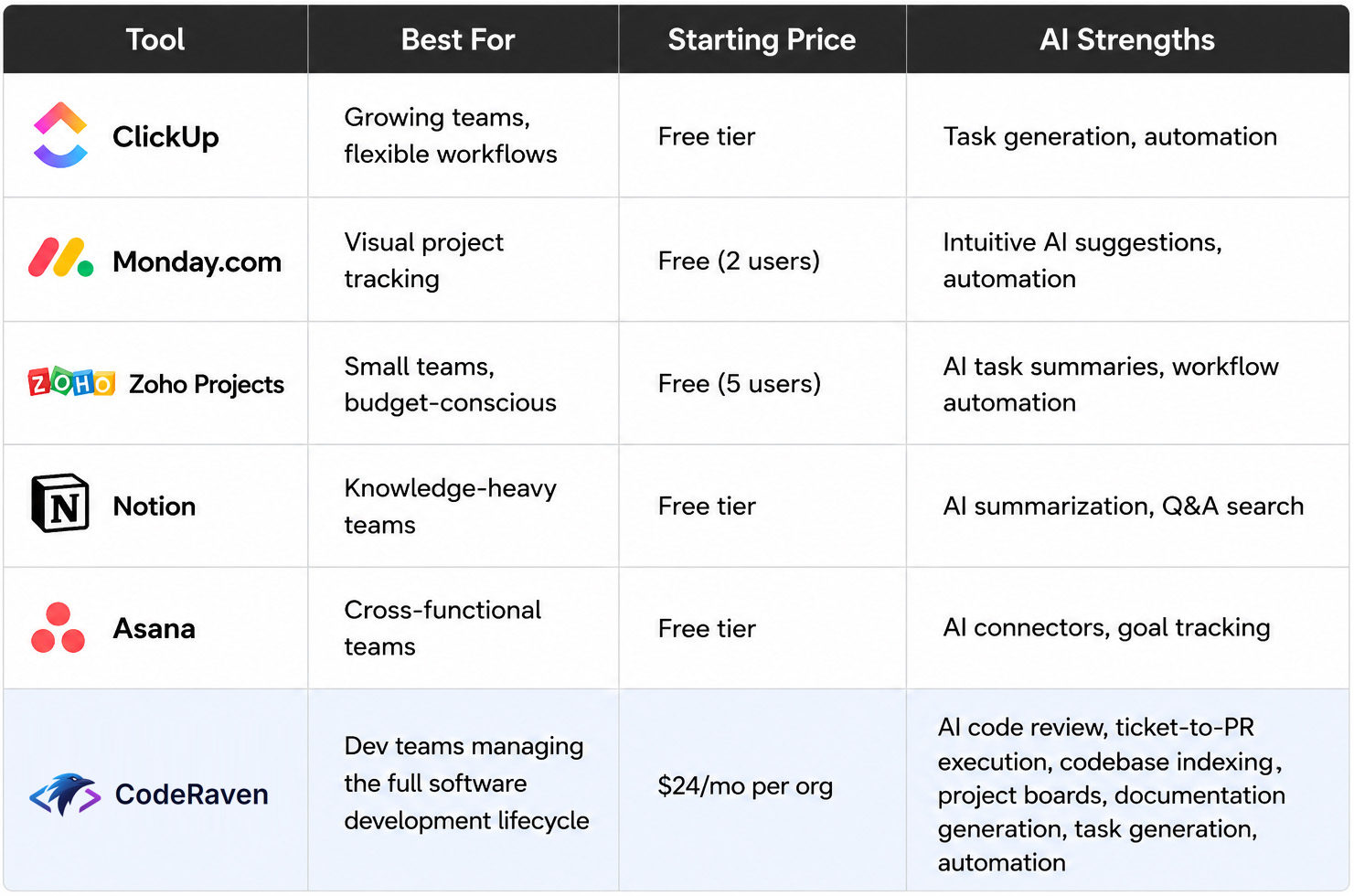
For beginners in 2026, ClickUp and Monday.com are the strongest starting points. ClickUp offers a generous free tier with AI features and room to grow as your team scales. Monday.com provides the most intuitive visual interface with the shortest learning curve of any tool in this list.
For small teams on tight budgets, Zoho Projects lets you organize tasks, track progress, and tap AI-powered features without spending a dollar. It’s a solid fit for teams that want structure and automation without the price tag.
For development teams, CodeRaven takes a different approach than the rest of the tools here. Rather than adding AI to a general-purpose project management layer, it’s built around the dev workflow specifically: sprint planning, project boards, ticket-to-PR execution, and codebase-aware code review in one place. Pricing is per organization rather than per seat, which makes the math friendlier as teams grow.
Step 4: Build Clean Data Habits First
This is the step most beginners skip, and it’s the one that determines whether your AI tools deliver results or just automate garbage. All AI developments have one common prerequisite: structured, reliable project data. Without proper planning, clear workflows, and transparent information, even the best AI is ineffective.
Make sure task statuses are updated daily. Keep your project boards current. This discipline is what separates teams that see ROI from AI tools and teams that don’t.
Step 5: Scale Into Predictive and Agentic Capabilities
The final phase introduces digital workers: autonomous AI agents that work alongside your team. These agents handle complex monitoring, risk detection, and data analysis 24/7. They learn from every interaction and get better over time.
For Portland businesses and Pacific Northwest companies working with technical agencies, this phase is where AI consulting becomes genuinely valuable, connecting your PM layer to your broader tech stack. Our post on agentic AI for business in 2026 explains what this looks like in practice.
Common Mistakes That Derail AI Project Management Adoption
Even experienced teams stumble in predictable ways. Here are the four most common failure patterns:
Buying tools before auditing processes. AI amplifies your existing workflows, good or bad. If your project board is stale, AI will mostly automate stale reporting.
Treating AI as a replacement, not an accelerant. The use of AI in project management improves project delivery, increases ROI, and improves benefits realization, but AI cannot replace project managers, because human judgment is required to manage data, interpret insights, and take action.
Ignoring governance. Inaccuracy is the AI-related risk that organizations most often experience and are working to mitigate. Always verify AI-generated outputs before sharing them with stakeholders or making scheduling decisions based on them.
Moving too fast. 56.5% of companies struggle with adoption, not because the technology fails, but because they skip the foundation-building phase.
AI Project Management for Small Teams and Startups
You don’t need an enterprise budget to get meaningful results. AI project management tools are scalable and suitable for businesses of all sizes. Small businesses can benefit from the efficiency and automation these tools provide, while large enterprises can leverage advanced analytics and data processing capabilities.
For small teams and startups, the smartest move is to use general-purpose AI tools (like ChatGPT or Claude) alongside lightweight PM platforms before investing in purpose-built enterprise suites. For free tools to enhance project management on a small scale: such as defining project scope, creating project requirements, or creating a project timeline, ChatGPT can serve as a useful AI assistant. You can give it prompts for breaking down projects into simpler tasks, creating to-do lists, prioritizing tasks based on goals and deadlines, creating project budgets, and drafting proposals and reports.
This aligns well with the broader AI consulting approach we use with clients at SLIDEFACTORY: starting with the highest-impact workflows, proving value quickly, and then building out the infrastructure. Our AI consulting and development service is specifically designed for companies at this stage.
Should You Get Certified in AI Project Management?
If you’re building a career or a practice around AI-driven delivery, formal credentials are worth considering. Whether you’re already delivering AI initiatives or eager to start, the PMI-CPMAI certification gives you the structure and credibility to turn innovation into measurable value: regardless of your role, whether project manager, technologist, data expert, or consultant.
For those who just want to upskill without committing to a full certification, the project managers who will thrive in 2026 are not necessarily the ones who can code. They are the ones who know exactly when to trust AI and when to override it.
What This Means for Your Business
AI project management isn’t a future trend, it’s the operational standard for competitive businesses in 2026. The gap between teams using it well and teams not using it at all is widening fast. According to research from Atlassian, workers who use AI report 33% higher productivity, and that number compounds as workflows mature.
The entry point has never been lower. Start with one tool, one workflow, and one measurable outcome. Then scale from there.
At SLIDEFACTORY, we work with startups and growing businesses across Portland and the Pacific Northwest to build practical AI systems, not just install software, but architect the workflows, integrations, and governance models that make AI actually deliver. If you’re ready to move from experimentation to execution, our AI for project managers and business owners guide is a good next read, or explore what an AI workflow stack looks like when it’s built to scale.
Ready to build something smarter?
Talk to the SLIDEFACTORY team about AI consulting for your projects, we’re on SE Belmont in Portland and work with companies of all sizes.